Repository navigation
Getting started
Install JDK 26 and select it for IntelliJ and Gradle. Run from the project root so the VM uses the intended storage.img.
.\gradlew.bat build
.\gradlew.bat run
On macOS/Linux use ./gradlew. IntelliJ can launch xyz.ignite4inferneo.Main directly. Click the display before typing. Enter HELP for commands, DIR for files, or JCTRL for the desktop. Keyboard clicks are off by default; SOUND ON enables them.
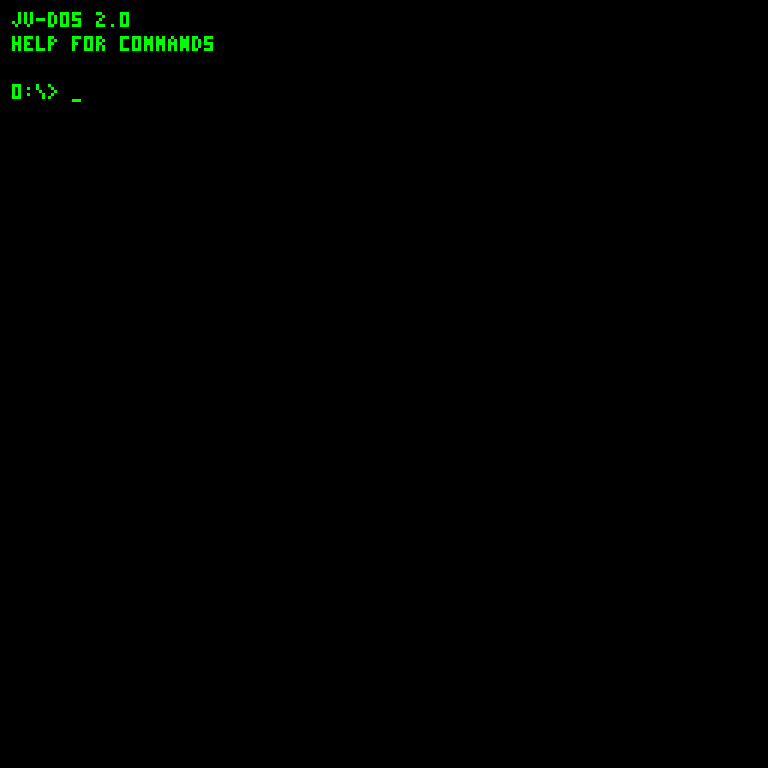
Device 0 uses the 16 MiB storage.img in the working directory. Startup formats an unformatted or incompatible mounted disk as JVFS 1. Older experimental filesystems have no migration; back up their images first. A newly formatted system disk receives HELLO.COM.
The installer writes BIOS/resident DOS firmware (currently revision 24) into the reserved disk area. It also installs or updates unchanged managed JCTRL.COM, TEXTEDIT.COM and PAINT.COM on drive 0. Existing valid JVFS files and modified/manual app copies are preserved. The guest bootstrap at RAM page 255 reads firmware from disk offset 512 into bank 0 and enters the BIOS, which transfers control to DOS.
The prompt shows your drive and folder, for example 0:\DOCS\>. There is one filesystem per disk. Use MKDIR DOCS, CD DOCS, and CD ..; commands generally accept names in the current folder rather than arbitrary paths.
Mount another disk with:
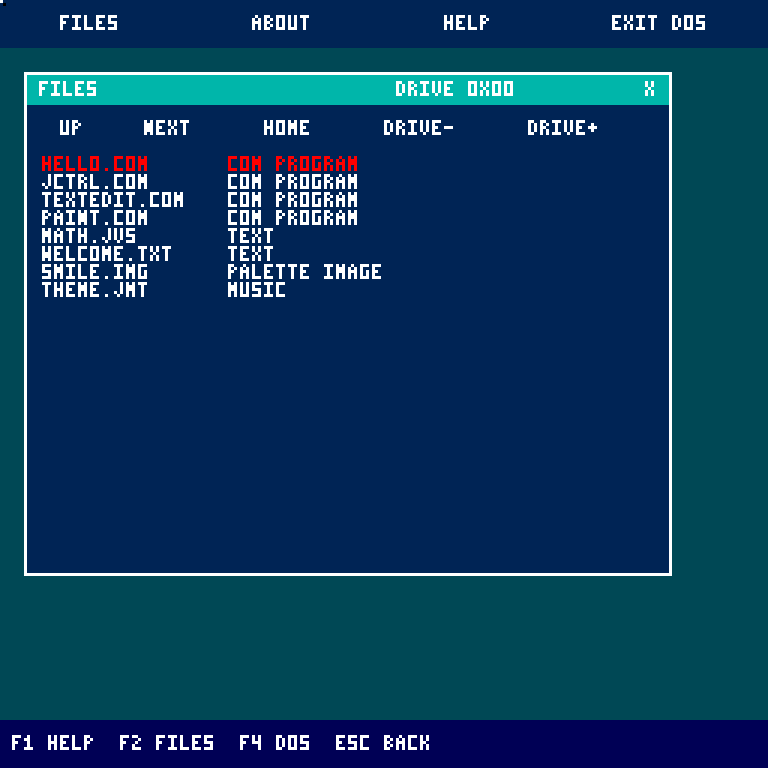
.\gradlew.bat run --args="--disk=1=secondary.img"DRIVE 1 selects it in DOS. In JCTRL, DRIVE-/DRIVE+ switches Files between mounted devices. Stop the VM before replacing any disk file.
Use EDIT DEMO.JVS, enter the following, and press Esc to save and exit:
STORE 6 A
STORE 7 B
MULTIPLY A B C
OUTPUT C
END
Run DEMO or RUN DEMO.JVS to print 42. Up/Down recalls the last sixteen prompt commands; Tab completes commands and current-folder filenames. The JVS guide describes the language.
Enter JCTRL, then open TEXTEDIT.COM or PAINT.COM from Files. TextEdit uses F7 to save; Paint uses F7 to save PAINT.JVI. Their Esc/X controls close without saving, unlike DOS EDIT. See application controls.
| Source / directory | Responsibility |
|---|---|
Main.java, OPCode.java, Registers.java
|
CPU execution, 31 encodings and register indices |
Memory.java |
Two banks of 256 pages, 256 bytes each |
Monitor.java, FramePacer.java
|
Framebuffer presentation and roughly 30 Hz pacing |
Input.java, Audio.java, Storage.java, Network.java
|
Host-backed devices |
DiskInstaller.java, BundledDesktopInstaller.java
|
Firmware and managed-app installation |
Programs.java, jvdos/JvDosImage.java
|
BIOS, DOS shell, editor and interpreter |
jvdos/GuestFileSystem.java, jvdos/JvFileSystem.java
|
Resident guest driver and independent host tooling |
jvdos/DesktopImage.java, TextEditImage.java, PaintImage.java, InstallerImage.java
|
Guest desktop/application/setup assemblers |
examples/ |
Guest programs, Java generators and generated COM files |
tools/disk-workshop/, tools/web-gateway/
|
Browser disk editor/converters and optional WEB HTTPS transport |
src/test/java/, tools/wiki/
|
Headless guest regressions, screenshot capture and wiki sync |
docs/wiki/, wiki/
|
Editable guides and linked GitHub wiki checkout |
build runs the project checks. storageRegression can run without external test-library dependencies. Additional app checks and asset generators are listed in Tooling. Generate API docs with .\gradlew.bat javadoc; open build/docs/javadoc/index.html.