
Real-time Docker infrastructure visualizer. See your containers, networks, volumes, and their relationships as an interactive graph that updates live as your infrastructure changes. Works on a single Docker host and across a Docker Swarm cluster.





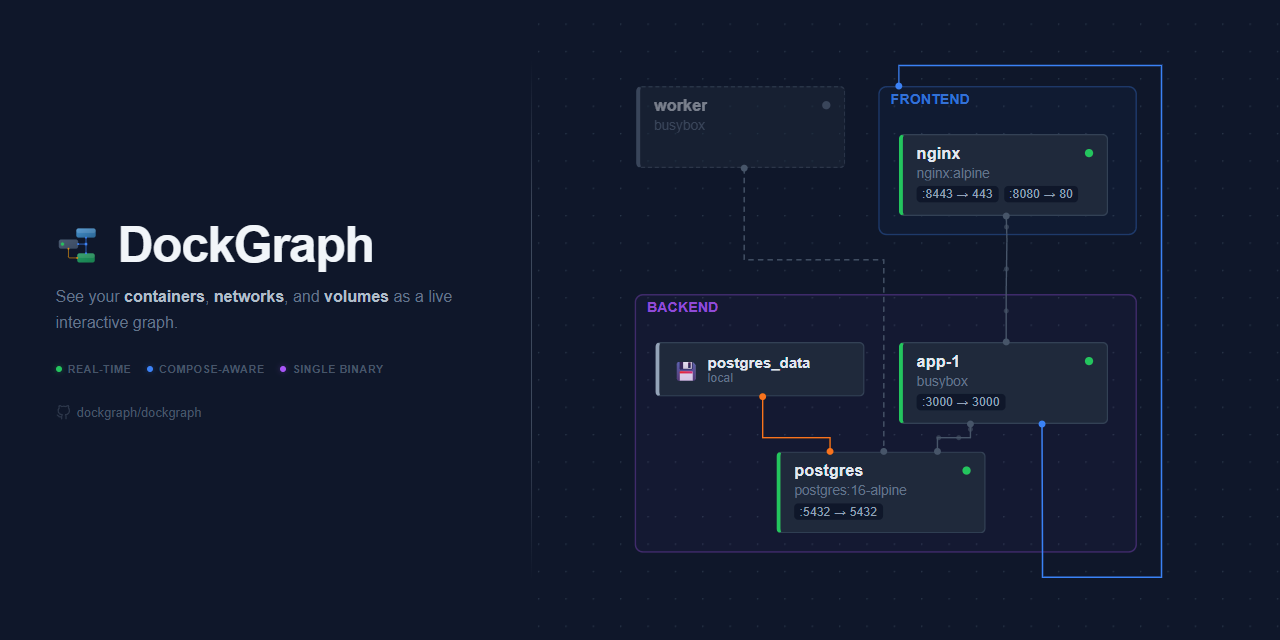
- Live topology graph — containers, networks, and volumes rendered as an interactive, zoomable graph
- Table view — alternative tabular view with sortable columns, grouping by compose project / stack / network / status / driver, and collapsible groups; a Services tab lists swarm services with their replica counts
- Dashboard view — 13-card monitoring dashboard with resource charts, top consumers, event timeline, alerts, disk usage, images, and compose project / stack overview
- Global logs — a unified, time-ordered log stream that aggregates every container into one view to trace an event across services; filter by text (literal or regex) or container, drill in with per-row filter actions, scroll back through merged history alongside the live tail, and find within (Ctrl+F)
- Pop-out log windows — open any container's logs in a floating, movable and resizable window; drag windows together into tabs, minimize them to a dock, and search within each
- Detail panels — open any resource (its ☰ in the graph, its row in the table) to inspect stats, ports, mounts, environment, labels, logs, health checks, and network configuration; cross-references (dependencies, networks, mounted volumes) link straight to the related resource, and any value is click-to-copy
- Real-time updates — watches the Docker event stream; the graph reflects changes within seconds
- Compose-aware — parses compose files to show services that haven't started yet, with the same detail panel as running containers (process config, environment, labels, ports, dependencies, and volume mounts) and clickable cross-references into the resources they'll create
- Docker Swarm — on a swarm manager, services are shown with their replica counts, tasks and the nodes they run on, grouped by stack; a lightweight per-node agent brings container stats, inspect and logs from every node of the cluster (details)
- Stack scoping — a header selector scopes the graph, table, dashboard, logs and stats to one compose project or swarm stack (shareable via
?stack=) - Swarm node view — switch the graph from networks to nodes to see which tasks run where: managers and workers in their own groups, node health and resource bars, a control-plane link showing worker health, and overlay-network links between services on different nodes; a Swarm Nodes dashboard card and per-node history charts complete the cluster picture
- Network grouping — containers are visually grouped by their primary network
- Dependency visualization —
depends_onedges with animated flow dots for running services - Volume relationships — named volume mounts shown as edges between volumes and containers
- Multi-network support — secondary network connections rendered as cross-group edges
- Search and filter — filter resources by name, type, or status with real-time results across both views
- Dark/light theme — toggle between themes, persisted in localStorage
- Click-to-highlight — click any node or edge to highlight its connections, fading unrelated elements; a node's ☰ also highlights it while opening its detail panel and centring the view on it
- Password protection — optional authentication with Argon2id hashing and JWT sessions; the password can come from a Docker secret (
DG_PASSWORD_FILE) - Single binary — frontend is embedded into the Go binary; one container, no external dependencies
- Self-excluding — DockGraph hides its own container, networks, and volumes from the graph
docker run -d \
  -p 127.0.0.1:7800:7800 \
  -v /var/run/docker.sock:/var/run/docker.sock:ro \
  --label dockgraph.self=true \
  dockgraph/dockgraph
Open http://localhost:7800. To reach it from other machines, publish -p 7800:7800 and set a password (-e DG_PASSWORD=..., see Security Considerations).
Add DockGraph as a service in your existing compose.yml:
services:
  dockgraph:
    image: dockgraph/dockgraph:latest
    ports:
      - "127.0.0.1:7800:7800" # Web UI; for other machines use "7800:7800" and set DG_PASSWORD
    volumes:
      - /var/run/docker.sock:/var/run/docker.sock:ro # Docker API access
      - ./compose.yml:/compose/compose.yml:ro # Optional: show services before they start
    labels:
      dockgraph.self: "true" # Hide DockGraph from its own graph
Compose file mounts are optional — they let DockGraph show services defined in your compose files even when they aren't running yet. Just mount a file or directory and DockGraph picks it up automatically.
Three demo stacks of increasing complexity are included for showcasing DockGraph at different scales — from a 5-service web app to a ~46-service SaaS platform. Two Docker Swarm stacks (make demo-swarm) showcase swarm mode, the stack selector and the node view. See demo/README.md for setup and architecture.
DockGraph auto-detects compose files from mounted volumes — no extra configuration needed. Any bind-mounted file or directory (except the Docker socket) is scanned recursively for .yml/.yaml files.
# Single file
volumes:
  - /var/run/docker.sock:/var/run/docker.sock:ro
  - ./compose.yml:/compose/compose.yml:ro           # auto-detected

# Entire directory (all .yml/.yaml files picked up recursively)
volumes:
  - /var/run/docker.sock:/var/run/docker.sock:ro
  - ./stacks:/compose/stacks:ro                     # auto-detected

# Multiple mounts
volumes:
  - /var/run/docker.sock:/var/run/docker.sock:ro
  - ./frontend.yml:/compose/frontend.yml:ro          # auto-detected
  - ./infra:/compose/infra:ro                        # auto-detected

# Override auto-detection with DG_COMPOSE_PATH
volumes:
  - /var/run/docker.sock:/var/run/docker.sock:ro
  - ./stacks:/compose/stacks:ro
environment:
DG_COMPOSE_PATH: "/compose/stacks/production.yml" # scan only this file| Variable | Default | Description |
|---|---|---|
DG_BIND_ADDR |
0.0.0.0 |
Listen address inside the container. Keep 0.0.0.0 in a container (publish on 127.0.0.1:7800:7800 to restrict to the host); 127.0.0.1 only suits running the binary directly |
DG_PORT |
7800 |
HTTP listen port |
DG_POLL_INTERVAL |
30s |
Docker API polling interval |
DG_COMPOSE_PATH |
(auto-detect) | Override: comma-separated list of compose/stack files or directories to scan; prefix an entry with name= (e.g. shop=/stacks/shop.yml) to set its project/stack name |
DG_PASSWORD |
(disabled) | Password for UI and WebSocket access (plaintext or argon2id hash); when set, requires login to view the dashboard |
DG_PASSWORD_FILE |
(none) | File to read the password from (e.g. a Docker secret; plaintext or argon2id hash); DG_PASSWORD wins if both are set. The server refuses to start if the file is unreadable or empty |
DG_ALLOWED_HOSTS |
(none) | Host names the UI is served under, besides IP addresses and localhost: comma-separated, .example.com (or *.example.com) for a domain and its subdomains, * for any. Checked when DG_PASSWORD is unset, or whenever this is set; other hosts get 403 |
DG_TRUSTED_PROXIES |
(none) | Comma-separated IPs/CIDRs of reverse proxies whose X-Forwarded-For (client address, for login rate limiting and connection limits) and X-Forwarded-Proto (Secure session cookie) are trusted |
DG_STATS_INTERVAL |
3s |
Container stats poll interval (Go duration) |
DG_STATS_WORKERS |
50 |
Max concurrent stats API calls |
DG_MODE |
auto |
auto, standalone, swarm or agent. auto picks swarm on a swarm manager and standalone outside a swarm; it refuses to start on a swarm worker, on a pending, locked or errored swarm node, or when the daemon can't be queried after retrying for about 30 seconds |
DG_SWARM_POLL_INTERVAL |
5s |
Swarm task poll interval (Go duration, min 1s) |
DG_AGENT_PORT |
7801 |
Per-node agent HTTP port (agents listen on it, the server dials it) |
DG_AGENT_ADDR |
tasks.agent |
DNS name resolving to every agent task, optionally host:port |
DG_AGENT_KEY |
(none) | Server only: private key it signs agent requests with (from dockgraph --agent-keygen). Without it (or DG_AGENT_TOKEN) the swarm server runs without agents |
DG_AGENT_KEY_FILE |
(none) | File to read the private key from (e.g. a Docker secret); DG_AGENT_KEY wins if both are set. The server refuses to start if the key is unreadable or malformed |
DG_AGENT_PUBLIC_KEY |
(none) | Agent only: public key the server's requests must be signed with (from dockgraph --agent-pubkey); several, separated by commas or newlines, while rotating keys. Required in agent mode unless DG_AGENT_TOKEN is set |
DG_AGENT_PUBLIC_KEY_FILE |
(none) | File to read the public keys from (e.g. a Docker config); DG_AGENT_PUBLIC_KEY wins if both are set |
DG_AGENT_TOKEN |
(none) | Deprecated, replaced by the keys above: shared bearer secret between server and agents. Agents with a public key ignore it; token-only mode will be removed in a future release |
DG_AGENT_TOKEN_FILE |
(none) | File to read the agent token from (e.g. a Docker secret); DG_AGENT_TOKEN wins if both are set |
On a swarm manager, DockGraph shows services (with replica counts, tasks and the nodes they run on) grouped by stack, instead of individual containers. Use the stack selector to scope the graph, logs and stats to one stack.
stack.yml deploys two services:
server— the UI and API, pinned to a manager (node.role == manager), published on port 7800 through the routing mesh.agent— a global service (one task per node) that exposes that node's container stats, inspect and logs, and its volumes, to the server. It publishes no port and is only reachable on the stack's internal overlay network.
# On a manager: create the agent keys once. The private key becomes a
# secret only the server gets; agents get the public key as a config.
(umask 077 && docker run --rm dockgraph/dockgraph --agent-keygen > dg_agent_key)
docker run --rm -i dockgraph/dockgraph --agent-pubkey < dg_agent_key | docker config create dg_agent_pubkey -
docker secret create dg_agent_key dg_agent_key
rm dg_agent_key

# Deploy (or: make swarm-deploy)
docker stack deploy -c stack.yml dockgraph

# Open http://<any-node>:7800
Both services carry the dockgraph.self=true label (as a service label under deploy.labels and as a container label) so DockGraph hides itself. DG_AGENT_ADDR defaults to tasks.agent, which resolves to every agent task inside the stack; change it only if you rename the agent service.
To show services from stack files that are not deployed yet, mount them into the server service (the path must exist on the manager it runs on) and name each file after its stack, as you would with docker stack deploy -c file <name>:
volumes:
  - /opt/stacks/shop.yml:/stacks/shop.yml:ro
environment:
  DG_COMPOSE_PATH: "shop=/stacks/shop.yml"
Demo stacks for swarm are in demo/stack-small.yml and demo/stack-medium.yml (see demo/README.md).
Stacks deployed before agent keys share one dg_agent_token secret between the server and the agents. It still works, with a warning; keys are recommended because agents then hold only a public key. To move to keys, create them as above, then either:
- Redeploy the new
stack.yml. Until every agent has restarted with the public key, nodes still on the token have no stats or remote details, and the server logs that they rejected its credentials. Thendocker secret rm dg_agent_token. - Or move without a gap, in three deploys:
- Give the server the key and keep its token: add
DG_AGENT_KEY_FILEand thedg_agent_keysecret to theserverservice. It now signs its requests and still sends the token. - Give the agents the public key: in the
agentservice, replaceDG_AGENT_TOKEN_FILEand thedg_agent_tokensecret withDG_AGENT_PUBLIC_KEY_FILEand thedg_agent_pubkeyconfig, as instack.yml. - Remove
DG_AGENT_TOKEN_FILEand the secret from theserverservice, thendocker secret rm dg_agent_token.
- Give the server the key and keep its token: add
Agents accept several public keys, so the keys can later be replaced without a gap: give the agents a config with both the old and the new public key, then give the server the new private key, then give the agents a config with only the new public key. Secrets and configs cannot be changed in place, so each one is created under a new name and set as name: of the external secret or config in stack.yml; the file inside the containers keeps its path.
- Stack selector — the header selector scopes every view to one stack (or to standalone containers). The choice lives in the URL (
?stack=), so a scoped view can be bookmarked or shared. - Graph by network (default) — services appear inside their overlay networks like containers do, with replica badges. A service's ☰ opens its detail panel: mode, replicas, the task table with the node of each task, and live service logs merged across nodes.
- Graph by node — the Network | Node toggle above the graph (
?group=node) lays out one box per swarm node, with a card for each service listing the tasks it runs there. Managers (leader first) and workers sit in separate groups, fixed in place like the network view's. Each box shows the node's role, state, availability and CPU/memory against its capacity; inactive nodes are dimmed. Managers fan out one control link per worker, coloured and animated by that worker's state, and a badge centred between the two groups readscontrol / tcp 2377 / ready/total workers ready(or the number of workers down). Hovering a service highlights it on every node. As in the network view, clicking a card or box highlights it (a card also draws links to services it shares an overlay network with on other nodes), and its ☰ opens the detail panel and centres the view on it. The ☰ on the Managers or Workers tab opens a summary of the group, including, for managers, the quorum read live from the swarm. - Table — a Services tab lists swarm services with their replica counts, and the grouping options include the stack.
- Dashboard — a Swarm Nodes card lists every node with its role, task count and CPU/memory bars, and the resource history charts switch between Workload and Node series. The host, disk usage and images cards describe only the node DockGraph runs on, and name it.
- Without agents (no
DG_AGENT_KEYorDG_AGENT_TOKENon the server), topology, replica counts, service logs and the services of a network (with their tasks' addresses) still cover the whole cluster (they come from the manager's swarm API), but container stats, container inspect and container logs are only available for tasks on the server's own node. - With agents, the server resolves
tasks.agentperiodically, polls each agent for stats and proxies container inspect/logs to the node running the container. Volumes are node-local in a swarm, so a volume's detail panel is looked up on every node and names the node it describes (and any other node with a volume of the same name). A node whose agent is down or unreachable simply has no stats until it comes back. - Agents need the public key that matches the server's private key (or, without keys, the server's token). Agents reject requests signed with another key, or more than two minutes off their own clock, so keep node clocks in sync (NTP). A rejected node's data is missing: the server logs the rejection once (and again once it is fixed), and container or volume details that cannot be reached because of it show an "agent rejected the server's credentials" error rather than "not found".
- Running the standalone image on a swarm worker is refused in
automode; setDG_MODE=agentthere (orDG_MODE=standalonefor a local-only view).
- Stats are keyed by name. A standalone container named exactly like a swarm service (e.g. a container named
shop_webnext to theshop_webservice) shares its stats entry, and the service shows the container's usage. Compose names its containersproject-service-N, so this needs a manually named container. The server logs a warning when it happens. - Swarm nodes are keyed by hostname, which hides the stale entry a node leaves behind when it leaves and rejoins the swarm. Two live nodes with the same hostname (e.g. cloned VMs) therefore show as one, with their tasks and stats combined. Give each node a unique hostname; the server logs a warning when two ready nodes share one.
DockGraph requires access to the Docker daemon socket to read container, network, and volume state. Be aware of the following:
- Password protection. Set
DG_PASSWORDto require authentication for the web UI and WebSocket connections. When set, all access goes through a login page — the dashboard and its data are not served until the correct password is provided. Sessions last 7 days and are invalidated on server restart.To keep the password out of the environment, store it in a file (such as a Docker secret) and pointenvironment: DG_PASSWORD: "your-secure-password"
DG_PASSWORD_FILEat it. Surrounding whitespace is trimmed, and the file may hold a plaintext password or an argon2id hash. The server refuses to start if the file can't be read or is empty, so a broken secret never disables authentication.printf '%s' 'your-secure-password' | docker secret create dg_password -
Whenenvironment: DG_PASSWORD_FILE: "/run/secrets/dg_password" secrets: - dg_password
DG_PASSWORDis not set, DockGraph runs without authentication. Anyone who can reach the port can then read container configuration and logs, and that includes every container on the host: a published port is reachable through each Docker network's gateway. Run without a password only when the port is published on the host's loopback. - Publish on localhost when no password is set.
DG_BIND_ADDRsets the address inside the container, so restrict the published port instead:ports: - "127.0.0.1:7800:7800"
- Host names. Without a password, DockGraph answers only requests addressed to an IP,
localhostor a name listed inDG_ALLOWED_HOSTS, so a foreign web page cannot read it under its own name. Add the names you open the UI under (DG_ALLOWED_HOSTS: "dockgraph.lan"), or set a password. This includes the name a reverse proxy forwards: nginx'sproxy_pass http://dockgraph:7800sendsHost: dockgraph:7800unless you addproxy_set_header Host $host, and scripts callinghttp://dockgraph:7800send that name too. - Use a reverse proxy (nginx, Caddy, Traefik) for TLS termination if exposing DockGraph beyond your local network. DockGraph serves plain HTTP — the reverse proxy handles HTTPS. List the proxy's address in
DG_TRUSTED_PROXIESso login rate limiting tells clients apart and the session cookie is markedSecure. - Docker socket access is root-equivalent. Mounting the socket
:roonly protects the socket file; the Docker API behind it accepts every call, including creating privileged containers. DockGraph itself never starts, stops or modifies anything, but anything that takes over its process controls the host. To narrow that, put a read-only Docker API proxy (such as one allowing onlyGETrequests to containers, networks, volumes, events, info, images, services, tasks and nodes) between DockGraph and the socket, and pointDOCKER_HOSTat it. If the proxy blocks/info, setDG_MODE=standaloneorDG_MODE=swarm. - Non-root. The image runs as root so it can open the socket. To run unprivileged, give the container the socket's group:
user: "65532:65532"plusgroup_add: ["<gid of /var/run/docker.sock>"]. - Docker Swarm. In a swarm, the Docker socket is mounted on every node (the agent is a global service), so treat the
dockgraphstack as privileged on the whole cluster:- Keep the agent port (
7801) on the stack's internal overlay network. Never publish it;stack.ymldoes not. - The agent refuses to start without the server's public key (or the older token). The server signs every agent request with its private key, a Docker secret (
dg_agent_key) only theserverservice gets. An agent accepts a request only if it is signed by that key, addressed to the agent itself, made within two minutes of the agent's clock and not seen before, so whoever takes over the agent on a worker cannot call the agents on other nodes (an agent on a manager holds that manager's Docker socket, which controls the whole swarm anyway). Move stacks still on the shareddg_agent_tokento keys (see Moving from the agent token to keys). stack.ymlencrypts the internal overlay network (encrypted: "true"), which carries logs and inspect data between nodes. Remove it only on platforms without IPsec support (e.g. Docker Desktop) and only on a trusted network.- Set
DG_PASSWORD_FILE(backed by adg_passwordDocker secret, seestack.yml) orDG_PASSWORDon theserverservice, since its published port is reachable on every node through the routing mesh.
- Keep the agent port (
- Secret masking. Credentials in the configuration of running containers, swarm services and parsed compose services are masked before leaving the server: the values of environment variables and labels whose names look like credentials (
PASSWORD,SECRET,TOKEN,KEY, …), and credentials embedded in any value or command line, such as URL and DSN passwords (postgres://app:********@db), query parameters,key=valuepairs, header values, JSON and XML members, and credential flags, as well as driver options. Masking is best-effort: logs are not masked, so access to DockGraph is access to whatever containers print. Composeenv_file,label_fileand.envfiles, aninclude'senv_filetoo, are not read, since their paths would resolve inside DockGraph's own container; included compose files are read as part of the project. Variables in compose files are therefore interpolated from an empty environment: defaults (${TAG:-latest}) apply, and a required variable (${TAG:?}) makes the file fail to load. - Compose parsing runs in a separate process, one file at a time, so a file the parser cannot handle affects only that process: it is stopped after 30 seconds, may use at most 256 MiB of memory and gets none of DockGraph's environment but its time zone and home directory. Where the kernel provides Landlock, it can read only files under the compose paths (the auto-detected mounts or the
DG_COMPOSE_PATHentries): keep compose, included and extended files there, since one elsewhere, or reached through a symlink leading out of them, fails to load withpermission denied. - Verifying the image. Release images on Docker Hub and GHCR carry signed build provenance (GitHub artifact attestations) from the release workflow. Before running an image, check that it was built by this repository's release workflow:
Use
gh attestation verify oci://dockgraph/dockgraph:<version> --repo dockgraph/dockgraph
oci://ghcr.io/dockgraph/dockgraph:<version>for the GHCR image.ghreads the image from the registry, so rundocker loginfirst if it asks; add--bundle-from-ocito read the attestation stored next to the image rather than from GitHub.
DockGraph runs two collectors concurrently:
- Docker collector — polls the Docker API and watches the event stream for container, network, and volume changes
- Compose collector — auto-detects compose files from mounted volumes, parses them, and watches for filesystem changes
Both feed into a state manager that merges their outputs (Docker runtime data takes precedence) and broadcasts the unified graph over WebSocket. The React frontend receives these updates and renders the topology using the ELK layout algorithm.
In swarm mode, the Docker collector reads the swarm API instead: services, tasks and nodes, watched through service and node events plus a task poll. The server finds the per-node agents through the tasks.agent DNS name, merges their container stats with its own into per-service and per-node aggregates, and forwards container inspect and log requests to the node that runs the container.
For implementation details, see the backend and frontend READMEs.
- Go 1.26+
- Node.js 24+
- Docker daemon
make build          # Build frontend + backend
make test           # Run all tests (backend + frontend)
make test-coverage  # Run tests with coverage reports (enforces thresholds)
make lint           # Run all linters (golangci-lint + eslint)
make docker         # Build Docker image locally
make docker-up      # Start with Docker Compose
make swarm-deploy   # Deploy stack.yml to a swarm (needs the dg_agent_key secret and dg_agent_pubkey config)
make demo-swarm     # Deploy the swarm demo stacks
make help # Show all available targets# Backend
cd backend
go build -o dockgraph .
./dockgraph
# Frontend
cd frontend
npm install
npm run devThe Vite dev server proxies /ws and /healthz to the backend at localhost:7800.
make test              # Run all tests
make test-coverage     # Run with coverage (backend profile + frontend thresholds)
make swarm-smoke       # Swarm end-to-end smoke test (opt-in, not run in CI)
make swarm-cluster-up  # 5-node swarm made of Docker-in-Docker containers (opt-in)
make swarm-cluster-test # Multi-node failure scenarios against that cluster
The swarm smoke test builds the image, deploys stack.yml and a throwaway demo stack on the local daemon, and checks the API, the WebSocket snapshot, the node view data (swarm nodes, task placement, per-node stats) and DG_PASSWORD_FILE login from a Docker secret. On an existing swarm it only removes what it created. Outside a swarm, make swarm-smoke runs docker swarm init first and docker swarm leave --force at the end; ./test/swarm_smoke.sh without --yes refuses to do that.
A single-node swarm never exercises the server-to-agent path. make swarm-cluster-up builds a multi-node swarm (3 managers and 2 workers by default) out of docker:dind containers on one host and deploys the stack with a test workload; make swarm-cluster-test runs the failure scenarios in backend/clustertest against it, and make swarm-cluster-down removes it. It needs a rootful Docker daemon and about 2 GB of memory, and its nodes run with --privileged, which is root-equivalent on the host: only run it on a machine you control. The header of test/swarm_cluster.sh has the details.
| Component | Technology |
|---|---|
| Backend | Go, Docker Engine API, gorilla/websocket |
| Frontend | React 19, TypeScript, React Flow, ELK.js |
| Build | Vite, multi-stage Dockerfile |
| Runtime | distroless/static (production image) |
Existing Docker UIs focus on container management, not on understanding how your infrastructure fits together. DockGraph was born out of the need to see the full picture — containers, networks, volumes, and their relationships — at a glance, updating in real time as things change.
If you find this project useful, please consider giving it a ⭐ — it helps others discover it.
Contributions are welcome. Please read the contributing guide before submitting a pull request.
This project follows the Contributor Covenant code of conduct.
This project is licensed under the Business Source License 1.1. You are free to use, modify, and redistribute the software, including in production. The only restriction is offering it as a hosted service or embedding it as a feature in a commercial product. Each version converts to Apache License 2.0 four years after its release.